
AI Video Generators, A few years ago, making a decent video meant opening complicated editing software, spending hours on timelines, and hoping your computer didn’t crash halfway through exporting.
Now?
You can describe the video you want in a sentence.
That’s a pretty wild shift.
Video has always been one of the best ways to build an audience online. The problem was that it took too much time.
Writing a blog post might take three hours.
Editing a five-minute video could take ten.
AI is changing that equation.
It doesn’t mean video editing is dead.
It means the cost of creating good videos is dropping fast.
That’s great news if you’re a creator, marketer, entrepreneur, or anyone trying to grow online.
I’ve tested a lot of these tools over the last year, and here’s where I think they fit.
The Short Answer
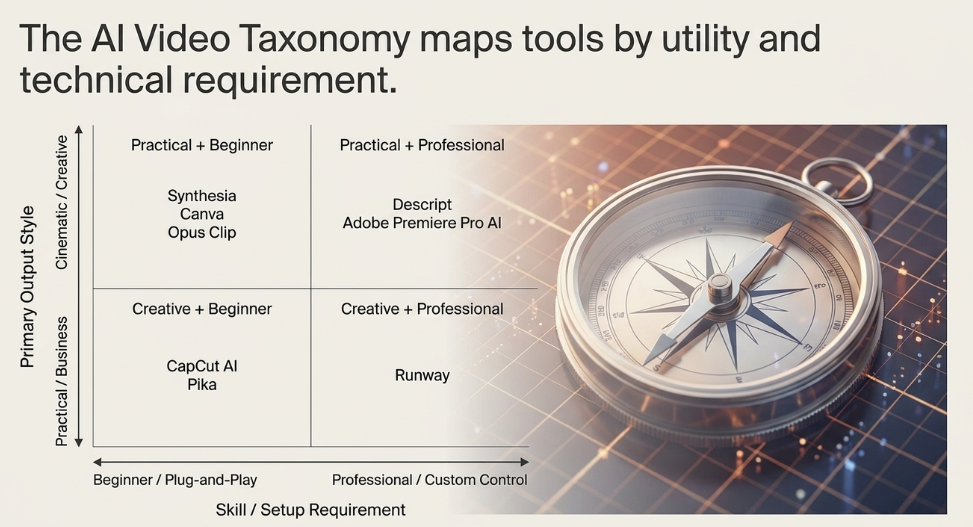
If you’re looking for the quick version:
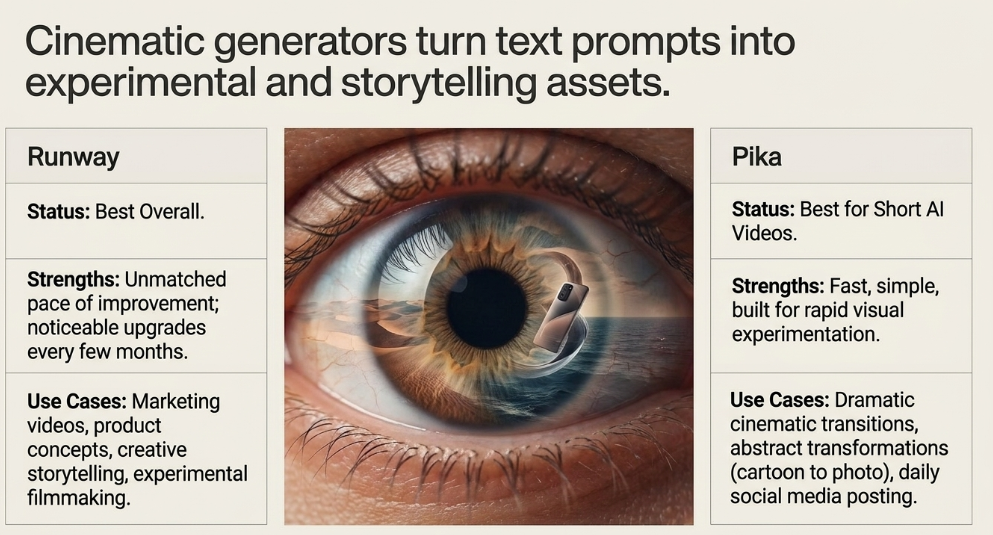
Best Overall: Runway
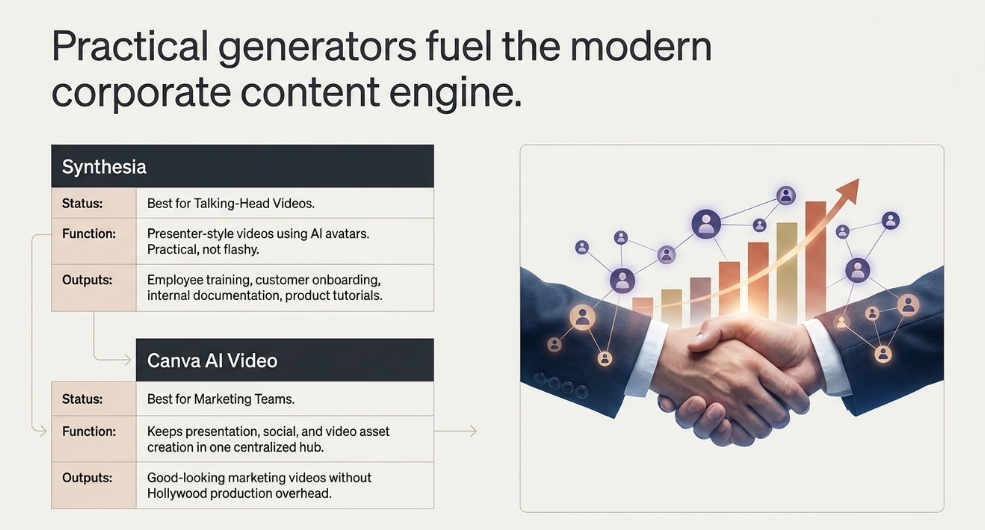
Best for Talking-Head Videos: Synthesia
Best for Short AI Videos: Pika
Best for Editing Existing Videos: Descript
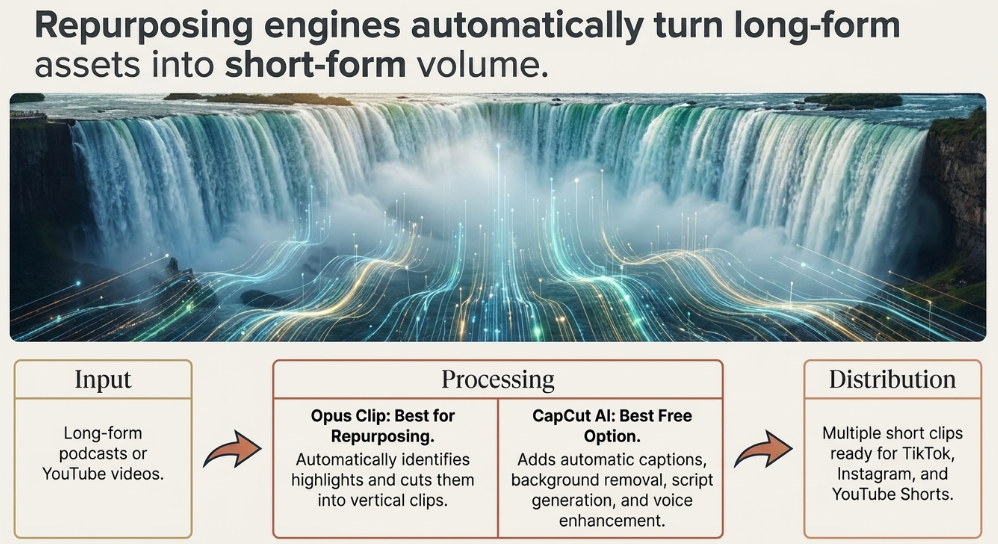
Best for Social Media Clips: Opus Clip
Best Free Option: CapCut AI
Now let’s get into why.
1. Runway
Best Overall
If AI video has an industry leader right now, it’s probably Runway.
The first time I used it, I had the same reaction most people do.
“This shouldn’t be possible.”
You type a prompt.
The software generates video.
Is it perfect?
Not yet.
Is it improving faster than almost any creative software I’ve ever seen?
Absolutely.
That’s why so many creators are paying attention.
Best For
- Marketing videos
- Product concepts
- Creative storytelling
- Social content
- Experimental filmmaking
What I Like
The pace of improvement.
Every few months it feels noticeably better.
2. Synthesia
Best for Business Videos
Not every business wants cinematic AI movies.
Sometimes you just need someone explaining a product.
That’s where Synthesia shines.
It creates presenter-style videos using AI avatars.
Think:
- Employee training
- Customer onboarding
- Internal documentation
- Product tutorials
- Educational content
If your business creates lots of instructional videos, this can save an incredible amount of time.
What I Like
It’s practical.
Not flashy.
Practical software usually wins.
3. Pika
Best for Short Creative Videos
Pika feels like it’s built for creators who love experimenting.
Want a product spinning in space?
A cartoon turning into a photograph?
A dramatic cinematic transition?
That’s where Pika gets interesting.
It’s fast.
Simple.
And surprisingly creative.
Best For
Creators who post regularly on social media.
4. Descript
Best Video Editor
Here’s my hot take.
Descript isn’t really competing with traditional editors.
It’s replacing them for a huge group of people.
Instead of editing timelines, you edit text.
Delete a sentence from the transcript.
The video updates automatically.
That sounds simple.
It also happens to save hours.
Best For
- Podcasts
- Interviews
- YouTube videos
- Business presentations
5. Opus Clip
Best for Repurposing Content
This is one of those tools that solves an obvious problem.
Long-form videos are valuable.
Short-form videos get attention.
Instead of manually finding highlights, Opus Clip identifies them automatically.
Upload a podcast.
Get multiple short clips ready for TikTok, Instagram, or YouTube Shorts.
Simple.
Best For
Creators publishing consistently.
6. CapCut AI
Best Free Option
CapCut was already one of the easiest video editors available.
Adding AI made it even better.
Automatic captions.
Background removal.
Script generation.
Voice enhancement.
For creators on a budget, it’s difficult to ignore.
7. Adobe Premiere Pro AI
Best for Professional Editors
Adobe isn’t trying to replace editors.
It’s trying to remove the repetitive work.
Things like:
- Object removal
- Auto reframing
- Audio cleanup
- Scene detection
Professionals still stay in control.
They just get there faster.
8. Canva AI Video
Best for Marketing Teams
Most businesses don’t need Hollywood production.
They need good-looking marketing videos.
Canva understands that better than almost anyone.
If you’re already creating presentations, social posts, or graphics in Canva, adding video feels natural.
Everything stays in one place.
Which Tool Do I Actually Recommend?
It depends on what you’re making.
If you’re creating cinematic AI content:
Use Runway.
If you’re training employees:
Use Synthesia.
If you’re editing interviews:
Use Descript.
If you’re growing on social media:
Use Opus Clip.
If you’re just getting started:
Use CapCut.
Different problems.
Different tools.
That’s a much better way to think about software.
The Biggest Mistake People Make
Most beginners assume AI video means pressing one button.
That’s not how it works.
At least not yet.
The best creators still spend time thinking about:
The story.
The pacing.
The hook.
The thumbnail.
The title.
AI helps produce content.
It doesn’t automatically make content interesting.
That’s still your job.
Will AI Replace Video Editors?
People ask this constantly.
I don’t think AI replaces great editors.
It changes what great editors spend time doing.
Instead of cutting silence from interviews, they’ll spend more time improving storytelling.
Instead of manually creating captions, they’ll think about audience retention.
The repetitive work disappears.
The creative work becomes more valuable.
That’s usually how technology changes industries.
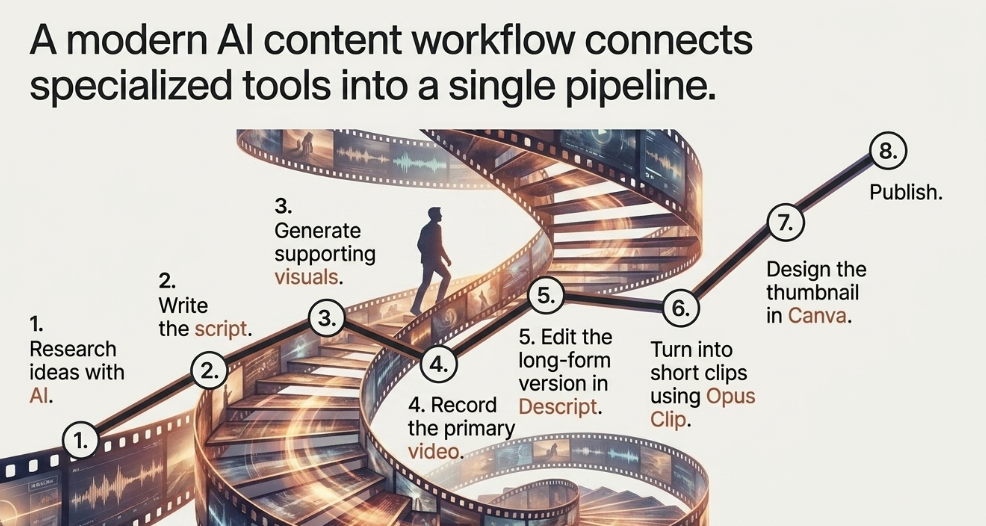
My Simple AI Video Workflow
If I were building a content business today, here’s what I’d do.
Research ideas with AI.
Write the script.
Generate supporting visuals.
Record the video.
Edit in Descript.
Turn the long-form version into short clips with Opus Clip.
Design the thumbnail in Canva.
Publish.
The workflow matters more than the individual software.
Final Thoughts on AI Video Generators
Video isn’t becoming less important.
It’s becoming easier to produce.
That’s a huge difference.
For years, the barrier to entry was technical skill.
Today, it’s creativity.
The creators who win won’t necessarily own the best camera.
They’ll consistently publish ideas people care about.
AI simply gives them the ability to do it faster.
And that’s a pretty good trade.